---
title: How to export data
description: Learn how to export a report into a PDF or XLSX file.
---
[Skip to content](https://support.technis.com/how-to-export-a-report#main-content)
- [English](https://support.technis.com/how-to-export-a-report)
- [Français](https://support.technis.com/fr/comment-exporter-ses-données)
English
Show submenu for translations
[](https://support.technis.com/?hsLang=en)
Open main navigation
Close main navigation
- - [English](https://support.technis.com/how-to-export-a-report)
- [Français](https://support.technis.com/fr/comment-exporter-ses-données)
English
Show submenu for translations
- [Contact us](mailto:support@technis.com)
[Contact us](mailto:support@technis.com)
How can we help you?
- There are no suggestions because the search field is empty.
1. [Technis](https://support.technis.com/?hsLang=en)
2. [Reports](https://support.technis.com/reports?hsLang=en)
June 10, 2026
# How to export data
Reports are a great way to visualize and interactively explore the data. To share your reports with team members, stakeholders or clients you can easily export reports into a PDF or XLSX file.
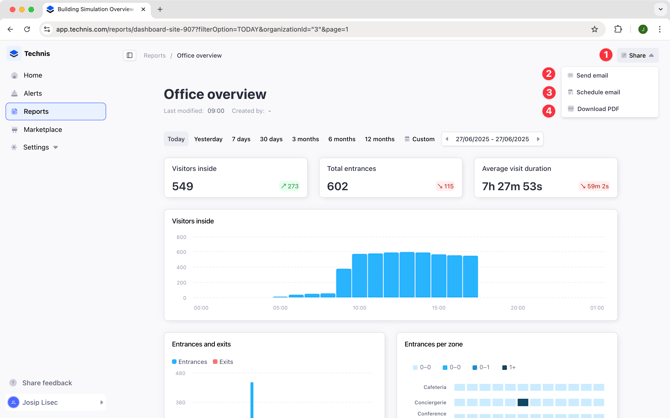
Exporting options are accessible from the **Share** menu of each report, and they include:
1. **Send email:** which lets you email an PDF or XLSX report to somebody else
2. **[Schedule export](https://27034588.hs-sites-eu1.com/en/scheduled-exports?hsLang=en): **to set up a recurring export that gets delivered to you by email
3. **[Download PDF](https://support.technis.com/how-to-export-a-report#pdf)/[XLSX](https://support.technis.com/how-to-export-a-report#xlsx):** lets you download a PDF or XLSX file directly
4. [**API**](https://apidocs.technis.com): Programmatically export historical data in large volumes
### PDF export
The exported PDF will contain all charts of your report, keeping a similar layout. For readability, some charts will take full width of PDF file, such as the table and pie charts.
**Export preview**
### XLSX export
When exporting to XLSX, each chart of your report will be represented as a sheet, with raw data included.
**Export preview**
Big number charts and text won't be exported.
- [Getting started](https://support.technis.com/getting-started?hsLang=en)
- [Reports](https://support.technis.com/reports?hsLang=en)
- [Alerts](https://support.technis.com/alerts?hsLang=en)
- [Devices and metrics](https://support.technis.com/devices-and-metrics?hsLang=en)
- [Admin](https://support.technis.com/admin?hsLang=en)
- [Releases](https://support.technis.com/releases?hsLang=en)
- [Announcements](https://support.technis.com/announcements?hsLang=en)
[](https://support.technis.com/?hsLang=en)
[mailto:support@technis.com](mailto:support@technis.com)
Copyright © 2026, Technis